🚚 Free Worldwide Shipping on All Orders!Shop Now
HomeStore

Cooling Fans for Steam Deck LCD & OLED

Product image 1
1 / 9
+4

Cooling Fans for Steam Deck LCD & OLED

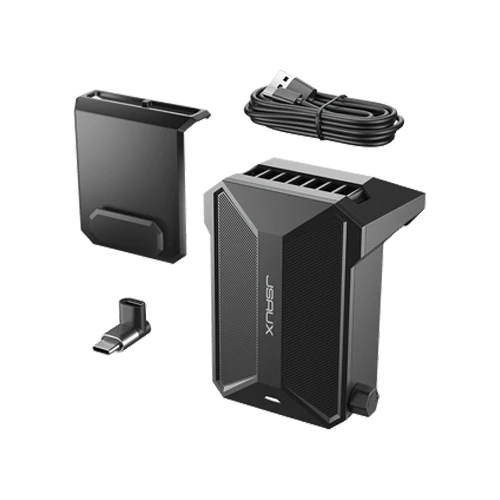
  • 怐Cooling Fan Designed for Steam Deck LCD & OLED怑Specifically engineered for Steam Deck LCD and OLED models, this external cooling fan helps extend gameplay sessions by improving thermal performance during high-load gaming.
  • 怐Adjustable Fan Speed Control怑Multiple speed levels allow you to customize airflow based on gameplay intensity, balancing cooling performance and noise for different gaming scenarios.
  • 怐Efficient Fast Cooling Performance怑High-speed airflow rapidly reduces device temperature, preventing overheating and maintaining stable performance during extended gaming sessions.
  • 怐Long Battery Life for Portable Use怑Built-in rechargeable battery supports 4–6 hours of continuous operation after a 1.5-hour full charge, ideal for travel and on-the-go gaming.
  • 怐Smart Power Mode Behavior怑Automatically switches to lowest speed when charging; restart required to unlock higher speed modes for full performance control.
Notes:
  • When the cooling fan runs out of power and is connected to the cable for charging, it will turn on the lowest wind speed by default and can't be adjusted. If you need to turn on the highest wind speed, you must turn off it first and then turn it on.
  • The Cooler Kit in PC0104 is equipped with a GP0200 cooling fan.
  • 怐Cooling Fan Designed for Steam Deck LCD & OLED怑Specifically engineered for Steam Deck LCD and OLED models, this external cooling fan helps extend gameplay sessions by improving thermal performance during high-load gaming.
  • 怐Adjustable Fan Speed Control怑Multiple speed levels allow you to customize airflow based on gameplay intensity, balancing cooling performance and noise for different gaming scenarios.
  • 怐Efficient Fast Cooling Performance怑High-speed airflow rapidly reduces device temperature, preventing overheating and maintaining stable performance during extended gaming sessions.
  • 怐Long Battery Life for Portable Use怑Built-in rechargeable battery supports 4–6 hours of continuous operation after a 1.5-hour full charge, ideal for travel and on-the-go gaming.
  • 怐Smart Power Mode Behavior怑Automatically switches to lowest speed when charging; restart required to unlock higher speed modes for full performance control.
Notes:
  • When the cooling fan runs out of power and is connected to the cable for charging, it will turn on the lowest wind speed by default and can't be adjusted. If you need to turn on the highest wind speed, you must turn off it first and then turn it on.
  • The Cooler Kit in PC0104 is equipped with a GP0200 cooling fan.

Select Size
From $12.60

Original: $35.99

-65%
Cooling Fans for Steam Deck LCD & OLED—

$35.99

$12.60

Description

  • 怐Cooling Fan Designed for Steam Deck LCD & OLED怑Specifically engineered for Steam Deck LCD and OLED models, this external cooling fan helps extend gameplay sessions by improving thermal performance during high-load gaming.
  • 怐Adjustable Fan Speed Control怑Multiple speed levels allow you to customize airflow based on gameplay intensity, balancing cooling performance and noise for different gaming scenarios.
  • 怐Efficient Fast Cooling Performance怑High-speed airflow rapidly reduces device temperature, preventing overheating and maintaining stable performance during extended gaming sessions.
  • 怐Long Battery Life for Portable Use怑Built-in rechargeable battery supports 4–6 hours of continuous operation after a 1.5-hour full charge, ideal for travel and on-the-go gaming.
  • 怐Smart Power Mode Behavior怑Automatically switches to lowest speed when charging; restart required to unlock higher speed modes for full performance control.
Notes:
  • When the cooling fan runs out of power and is connected to the cable for charging, it will turn on the lowest wind speed by default and can't be adjusted. If you need to turn on the highest wind speed, you must turn off it first and then turn it on.
  • The Cooler Kit in PC0104 is equipped with a GP0200 cooling fan.