🚚 Free Worldwide Shipping on All Orders!Shop Now
1 / 10
+5
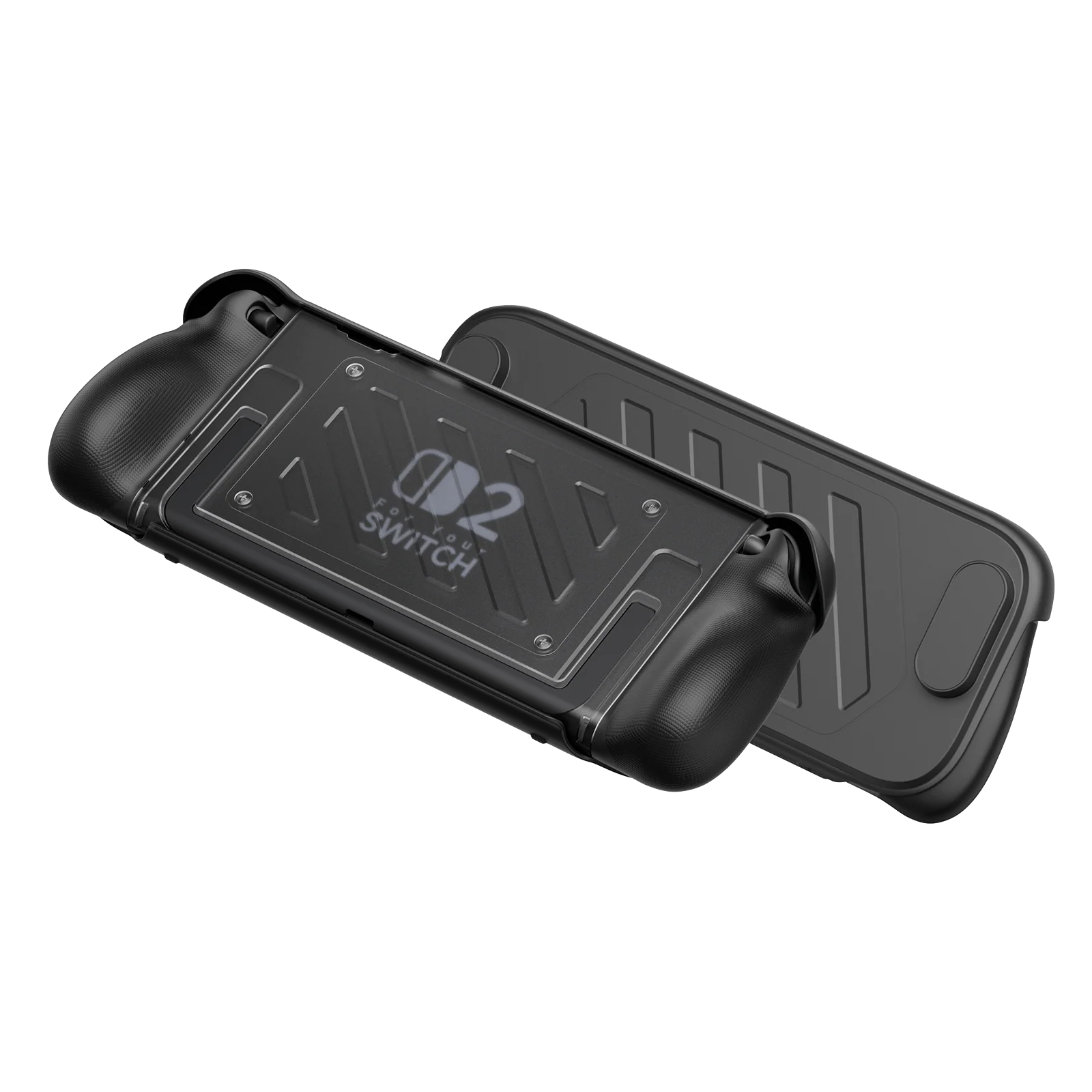
Split Protective Case for Switch 2
- 【Split-Design Protective Case for Nintendo Switch 2】Engineered for Switch 2, this split case allows easy Joy-Con removal without detaching the full case, while a U-shaped cutout ensures full use of the built-in kickstand for stable tabletop gaming.
- 【Dual-Material TPU + PC Protection】Built with a hybrid structure of hard PC and soft TPU, this case combines rigid impact resistance with shock-absorbing cushioning to protect your Switch 2 from drops, bumps, and daily wear.
- 【Front Cover with Screen Protection & Game Storage】Durable PC front cover shields the screen from scratches and also integrates 10 game card slots, making it easy to carry and organize your game library on the go.
- 【Ergonomic Thickened Grip Design】Reinforced grip structure follows the natural curve of your hands, improving comfort and reducing fatigue during long handheld gaming sessions.
- 【Dock-Friendly Installation with Secure Fit】Designed for stable docking with proper alignment instructions, ensuring a snug fit while maintaining protection and usability in both handheld and docked modes.
- 📢Note:
1. Please make sure to follow our instructional video when installing or removing the JoyCon protective case and front cover.
2. After installing the middle frame onto the Switch 2, press down on both bottom corners to ensure a snug fit.
3. Insert the Switch 2 with the case vertically into the dock. If it feels tight, apply light pressure—friction sounds are normal.
- 【Split-Design Protective Case for Nintendo Switch 2】Engineered for Switch 2, this split case allows easy Joy-Con removal without detaching the full case, while a U-shaped cutout ensures full use of the built-in kickstand for stable tabletop gaming.
- 【Dual-Material TPU + PC Protection】Built with a hybrid structure of hard PC and soft TPU, this case combines rigid impact resistance with shock-absorbing cushioning to protect your Switch 2 from drops, bumps, and daily wear.
- 【Front Cover with Screen Protection & Game Storage】Durable PC front cover shields the screen from scratches and also integrates 10 game card slots, making it easy to carry and organize your game library on the go.
- 【Ergonomic Thickened Grip Design】Reinforced grip structure follows the natural curve of your hands, improving comfort and reducing fatigue during long handheld gaming sessions.
- 【Dock-Friendly Installation with Secure Fit】Designed for stable docking with proper alignment instructions, ensuring a snug fit while maintaining protection and usability in both handheld and docked modes.
- 📢Note:
1. Please make sure to follow our instructional video when installing or removing the JoyCon protective case and front cover.
2. After installing the middle frame onto the Switch 2, press down on both bottom corners to ensure a snug fit.
3. Insert the Switch 2 with the case vertically into the dock. If it feels tight, apply light pressure—friction sounds are normal.
$10.50
Original: $29.99
-65%Split Protective Case for Switch 2—
$29.99
$10.50Description
- 【Split-Design Protective Case for Nintendo Switch 2】Engineered for Switch 2, this split case allows easy Joy-Con removal without detaching the full case, while a U-shaped cutout ensures full use of the built-in kickstand for stable tabletop gaming.
- 【Dual-Material TPU + PC Protection】Built with a hybrid structure of hard PC and soft TPU, this case combines rigid impact resistance with shock-absorbing cushioning to protect your Switch 2 from drops, bumps, and daily wear.
- 【Front Cover with Screen Protection & Game Storage】Durable PC front cover shields the screen from scratches and also integrates 10 game card slots, making it easy to carry and organize your game library on the go.
- 【Ergonomic Thickened Grip Design】Reinforced grip structure follows the natural curve of your hands, improving comfort and reducing fatigue during long handheld gaming sessions.
- 【Dock-Friendly Installation with Secure Fit】Designed for stable docking with proper alignment instructions, ensuring a snug fit while maintaining protection and usability in both handheld and docked modes.
- 📢Note:
1. Please make sure to follow our instructional video when installing or removing the JoyCon protective case and front cover.
2. After installing the middle frame onto the Switch 2, press down on both bottom corners to ensure a snug fit.
3. Insert the Switch 2 with the case vertically into the dock. If it feels tight, apply light pressure—friction sounds are normal.